
I recently posted on LinkedIn about my efforts to learn the “RDF stack” and was surprised to see the response it garnered. It seems that many others, especially in the realm of structured authoring and technical documentation, are also curious about this subject. Certainly I’m not the only one who has noticed terms like “knowledge graphs,” “ontologies,” and “GraphRAG” popping up more and more in discussions about AI and the future of content.
After spending a fair amount of time standing at the periphery of the Semantic Web, reading articles here and there, then books, then courses, I’ve finally learned enough to try my hand at creating a knowledge graph of my own.
This post will record my experience with creating a knowledge graph from scratch. I’m not using any special software to do this—I’m hand-typing this all out in the the free, browser-based “RDF Playground” and asking Google Gemini many questions along the way. (I encourage anyone reading this to pull up Google Gemini—or any other favorite AI chat application—themselves. Allow yourself to go down a rabbit hole asking questions until the jargon makes a little bit more sense. Keep coming back day after day and slowly but steadily it will start to click—at least, that’s been my experience.)
In the other tab, I’m looking at my Letterboxd film diary for the month of March 2026. I’m limiting the scope of my first knowledge graph to just this single month of personal movie viewing to keep things manageable. Letterboxd allows users to apply taxonomy tags to specific viewings of movies. But the information architect in me bristles at the fact that Letterboxd only allows for a flat, non-hierarchical taxonomy. In other words, I can’t create a tag of something like “film formats” and place “35mm” or “70mm” as child tags underneath it. If I could, then I could search only for the “film formats” tag and see results that include all the constituent, more-specific tags. One of my goals with the ontology I’ll create is to organize my tags into such a hierarchy.
Let’s begin!
Getting Started
I’m starting with a blank “text” field on RDF Playground. Alternatively, I could use any text editor software for this. If I were trying to build something more “serious” I might use a dedicated tool like Protégé—which, admittedly, I still haven’t tried myself despite seeing it brought up so often.
The first thing I do in the code is define my prefixes, mapping shorthand labels to their respective namespaces. As is commonplace, the namespaces look like URLs (“uniform resource locators”), but they don’t necessarily need to point to any real websites. The main point is that they are unique URIs (“uniform resource identifiers”). For my first vocabulary I’ll just go with “example.org”. (I’ll even occasionally break from my usual style preference to keep punctuation inside of quotes, since I don’t want to introduce any ambiguity into the specific technical terms, classes, and properties that I’ll be writing about.) Some people would choose a prefix that makes sense, like “ex” for “example” but I like the fact that I can leave it blank and use only the colon as my prefix, so that’s what I’ll do. This will be helpful because I’ll be using it a lot.
Then I bring in the RDF, RDFS, and XSD vocabularies with their standard URIs. I need RDF for the basic “triple” format—subject, predicate, object. That’s the basic shape of every line of data here. RDFS is needed so that I can build a basic ontology, meaning that I can declare some things as classes and other things as properties or subclasses. XSD will let me define data types. My first few lines of code look like this:
@prefix : <http://example.org/diary/> .@prefix rdf: <http://www.w3.org/1999/02/22-rdf-syntax-ns#> .@prefix rdfs: <http://www.w3.org/2000/01/rdf-schema#> .@prefix xsd: <http://www.w3.org/2001/XMLSchema#> .
Next, I decide how I want to refer to each “thing” in this data set coming from Letterboxd. I choose “Diary Entry” because that’s what I’m focusing on; I’m not recording movies so much as I’m recording specific, personal viewings of movies.
So I create my first definition: “A diary entry is a type of class,” written in the RDF Turtle syntax like this:
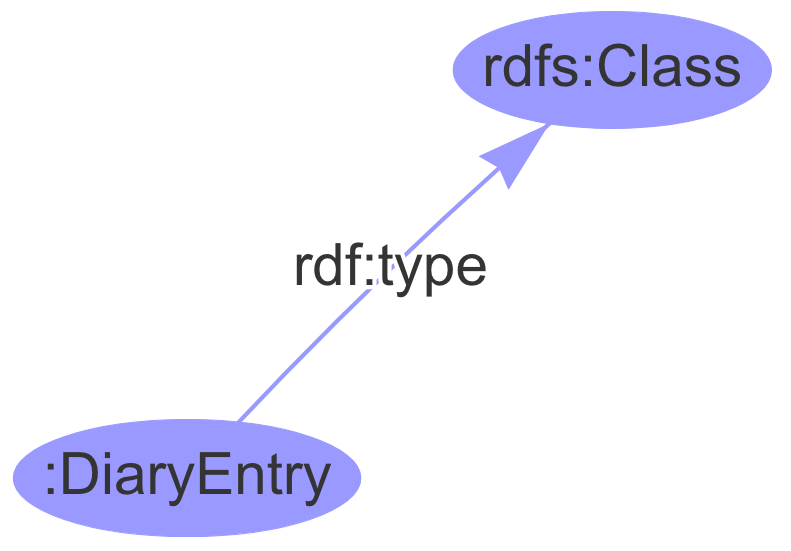
:DiaryEntry rdf:type rdfs:Class .
Every word (more accurately, “resource”) in that triple statement needs some kind of label appended to the beginning with a colon. Otherwise I’d be forced to write out the entire URI for each, and this document would quickly become too wordy to read easily. :DiaryEntry is something I made up just now. It uses my colon-only label. The other two resources come from the established RDF and RDFS vocabularies, respectively.
The letter a is shorthand for writing rdf:type. I like the shorthand better because it makes the data more readable, as if you can just look at it and say, “Diary entry is a type of class.”
:DiaryEntry a rdfs:Class .
Bringing in Data
Now I can start bringing in the “data.” These are the individual diary entries. I will hand-code these. I’m not exporting anything from Letterboxd and transforming the data into RDF format—I’m literally just opening up each web page on my Letterboxd diary and writing down the tags I see.
Let’s look at the web page for my diary entry for Superbad:
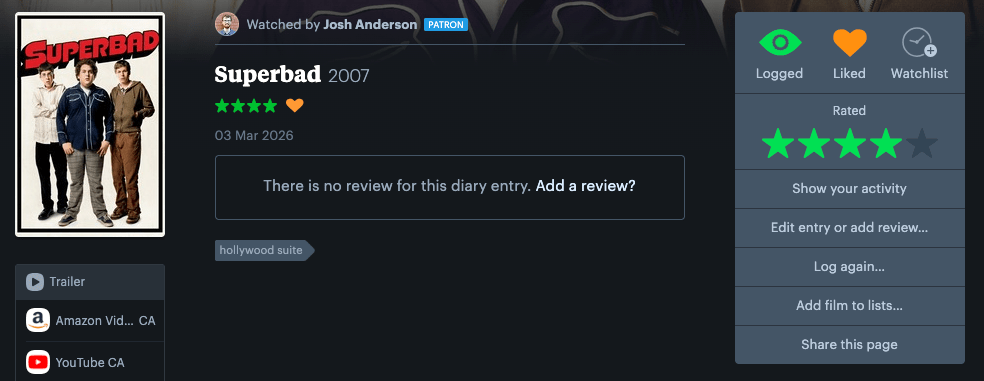
There’s lots of data here that I could choose to bring over to my RDF file. For example:
- The release year of the movie is 2007
- The date I watched it was March 3, 2026
- My score was “4 stars”
- I “liked” the movie (meaning that I gave it a “heart”)
- This diary entry is associated with a particular film poster, which has a URL (https://a.ltrbxd.com/resized/film-poster/4/7/7/7/6/47776-superbad-0-150-0-225-crop.jpg?v=b43686efcb)
- There is an absence of a review for this diary entry
It wouldn’t be “wrong” to note any of that information. But for now I’m only choosing what is meaningful to me. At this moment, I only care about the tag(s) I have associated with each diary entry, so this is all I will write in my RDF file:
:Superbad a :DiaryEntry ; :hasTag "hollywood suite" .
That’s all for now: I’m only saying that Superbad is a diary entry and has a tag. I’m not saying anything about what kind of tag it is. I’m not noting that “hollywood suite” is a type of streaming service. That can come later. In fact, I’m not even declaring “hollywood suite” as a proper resource—so far it’s only a hardcoded text string. For now, that is enough.
Later in the month, I watched The Red Shoes. That title includes spaces. When I bring this over to RDF, I will need to remove the spaces, much like how I removed the spaces for the phrase “diary entry”. I’ll encode it like this:
:TheRedShoes a :DiaryEntry ; :hasTag "criterion channel" .
The first movie I watched on a film print this month was Inherent Vice. This diary entry is also the first this month to have more than one tag associated with it.
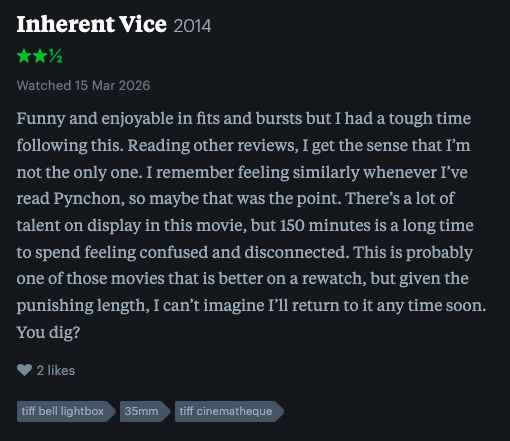
Its entry in my RDF data looks like this:
:InherentVice a :DiaryEntry ; :hasTag "tiff bell lightbox" ; :hasTag "35mm" ; :hasTag "tiff cinematheque" .
The last statement must always end in a period. Before then, I can use a semicolon as a shorthand way of saying the following statement shares the same subject, allowing me to omit the subject entirely.
A semantically equivalent, longer-form version of the above RDF would look like:
:InherentVice a :DiaryEntry .:InherentVice :hasTag "tiff bell lightbox" .:InherentVice :hasTag "35mm" .:InherentVice :hasTag "tiff cinematheque" .
Again, notice that I’m leaving out information on purpose. In my RDF file, I’m not mentioning that this movie was released in 2014, that I watched it on March 15, 2026, or that I gave it 2.5 stars. All I care about are the tags, seen at the bottom of the screenshot.
Eventually I get to my diary entry for Project Hail Mary, which I saw in 70mm IMAX, a gloriously huge format that only a handful of theaters in the world can accommodate. Ideally I would only give this one tag: “70mm imax”. However, because Letterboxd only allows for non-hierarchical, flat tagging, I ended up giving this several tags—not only “70mm imax” but also “70mm” and “imax”. This is so that this entry will show up on Letterboxd when I look for all movies I saw in IMAX (including the common, non-70mm regular IMAX) and also when I look for all the movies I’ve seen in 70mm (including the smaller format, non-IMAX regular 70mm). Later on, I can build a hierarchical ontology to handle this more elegantly. Instead of cluttering my data with redundant tags, I can just use “70mm IMAX” and write a SPARQL query that automatically catches it when I search for the broader parent tags like “70mm” or “IMAX”. For now, however, this is what that diary entry looks like in my RDF:
:ProjectHailMary a :DiaryEntry ; :hasTag "cineplex cinemas vaughn" ; :hasTag "70mm" ; :hasTag "70mm imax" ; :hasTag "imax" .
Putting all of the diary entries together, I now have a complete RDF file. Because it contains both an ontology (a very tiny one for now) as well as specific data (the diary entries), this is already a functional knowledge graph—not just a list but a network of related concepts:
@prefix : <http://example.org/diary/> .@prefix rdf: <http://www.w3.org/1999/02/22-rdf-syntax-ns#> .@prefix rdfs: <http://www.w3.org/2000/01/rdf-schema#> .@prefix xsd: <http://www.w3.org/2001/XMLSchema#> .# Defining My Ontology:DiaryEntry a rdfs:Class .# My Diary Entries:Bugonia a :DiaryEntry ; :hasTag "prime video" .:Superbad a :DiaryEntry ; :hasTag "hollywood suite" .:Re-Wind a :DiaryEntry ; :hasTag "criterion channel" .:www.RachelOrmont.com a :DiaryEntry ; :hasTag "revue cinema" .:BeijingWatermelon a :DiaryEntry ; :hasTag "criterion channel" .:TheRedShoes a :DiaryEntry ; :hasTag "criterion channel" .:Hamnet a :DiaryEntry ; :hasTag "123movies" .:SentimentalValue a :DiaryEntry ; :hasTag "prime video" .:CaliforniaSplit a :DiaryEntry ; :hasTag "hollywood suite" .:InherentVice a :DiaryEntry ; :hasTag "tiff bell lightbox" ; :hasTag "35mm" ; :hasTag "tiff cinematheque" .:Sirāt a :DiaryEntry ; :hasTag "tiff bell lightbox" .:WomanInTheDunes a :DiaryEntry ; :hasTag "criterion channel" .:KikisDeliveryService a :DiaryEntry ; :hasTag "cineplex odeon eglinton town centre cinemas" ; :hasTag "imax" .:ProjectHailMary a :DiaryEntry ; :hasTag "cineplex cinemas vaughn" ; :hasTag "70mm" ; :hasTag "70mm imax" ; :hasTag "imax" .:MinorityReport a :DiaryEntry ; :hasTag "revue cinema" ; :hasTag "16mm" .:MadMaxFuryRoad a :DiaryEntry ; :hasTag "4k uhd disc" ; :hasTag "owned" .
(You might notice the lines that begin with a #hashtag. These are simply comments in the code. They don’t encode any data; they only leave information for anyone reading the code.)
Making My First Query
With my knowledge graph, I can ask something like, “What tags are associated with Minority Report?” I’ll use SPARQL, a query language designed to retrieve data stored in RDF. The nice thing about the RDF Playground I’ve been using is that I can write SPARQL queries right next to the spot where I write my knowledge graph. My question, translated into a SPARQL query, is:
prefix : <http://example.org/diary/> SELECT ?tags WHERE { :MinorityReport :hasTag ?tags .}
The result, output as text, is this:
------------------| tags |==================| "16mm" || "revue cinema" |------------------
Expanding the Ontology
Ok, cool. Practically speaking, though, this isn’t too useful to me. The RDF data is small enough that I could just look at it directly to figure out what tags are there.
What I want to do now is revisit my Turtle file and start converting the text strings into resources. Then I will be saying, for example, “Minority Report is associated with the concept ’16mm’” instead of simply “Minority Report is associated with the text ’16mm’.” To the computer, “16mm” is just a random sequence of letters; I may as well have tagged it “apple” or “asdfasdaf”—it all means the same kinds of thing. Now, by defining classes, I am giving the computer domain knowledge. I’m getting to the place of declaring that these text strings actually mean something.
Let’s build out the ontology of the Turtle file. I want to define “film format” as a class and say that 16mm, 35mm, and 70mm are instances of that.
:FilmFormat a rdfs:Class .:16mm a :FilmFormat .:35mm a :FilmFormat .:70mm a :FilmFormat .
Now, I will change the relevant :hasTag statements. Instead of quotes (“35mm”), which create a literal text string, I will use the colon (:35mm), which links to the resource I have now defined.
That allows me to make these changes to my Turtle file:
:InherentVice a :DiaryEntry ; :hasTag "tiff bell lightbox" ; :hasTag :35mm ; # Now a concept, not a string :hasTag "tiff cinematheque" .:ProjectHailMary a :DiaryEntry ; :hasTag "cineplex cinemas vaughn" ; :hasTag :70mm ; # Now a concept :hasTag "70mm imax" ; :hasTag "imax" .:MinorityReport a :DiaryEntry ; :hasTag "revue cinema" ; :hasTag :16mm . # Now a concept
Asking Better Questions
By using :35mm instead of “35mm”, I have moved from data storage to data modeling. Because :35mm is now a resource defined as a :FilmFormat, I can now ask the system questions it couldn’t answer before. Now I have all I need to ask “Which movies did I watch on film?” That’s what this SPARQL query will do—select all movies where the movie has a tag that is a type of film format:
prefix : <http://example.org/diary/>SELECT ?movie WHERE { ?movie :hasTag ?tag . ?tag a :FilmFormat .}
And the result is:
----------------------------------------------| movie |==============================================| <http://example.org/diary/ProjectHailMary> || <http://example.org/diary/InherentVice> || <http://example.org/diary/MinorityReport> |----------------------------------------------
Awesome! Even though I never explicitly used the tag “Film Format” on Letterboxd, I have now defined an ontology that is able to infer Project Hail Mary, Inherent Vice, and Minority Report as movies that I watched on film, because
- I associated those diary entries with the classes
:70mm,:35mm, and:16mm, respectively, and - I defined
:70mm,:35mm, and:16mmas instances of the class:FilmFormat.
Before I had made these associations, if I wanted to search for any movie viewed on film, I would have needed to hardcode all of the possible tags into my query, writing something ugly like FILTER (?tag = "16mm" || ?tag = "35mm" || ?tag = "70mm"). Now, I can rely on the more semantic ?tag a :FilmFormat. I’m safe to add further instances of film formats without needing to extend my query.
Why stop there? Let’s build out my ontology further. First, I’ll do something similar with movie theaters:
:MovieTheater a rdfs:Class .:TiffBellLightbox a :MovieTheater .:CineplexOdeonEglintonTownCentreCinemas a :MovieTheater .:CineplexCinemasVaughn a :MovieTheater .:RevueCinema a :MovieTheater .
That allows me to change every entry related to a theater viewing. As before, I am changing strings into classes:
:www.RachelOrmont.com a :DiaryEntry ; :hasTag :RevueCinema . # Now a concept, not a string:InherentVice a :DiaryEntry ; :hasTag :TiffBellLightbox ; # Now a concept :hasTag :35mm ; :hasTag "tiff cinematheque" .:Sirāt a :DiaryEntry ; :hasTag :TiffBellLightbox . # Now a concept:KikisDeliveryService a :DiaryEntry ; :hasTag :CineplexOdeonEglintonTownCentreCinemas ; # Now a concept :hasTag "imax" .:ProjectHailMary a :DiaryEntry ; :hasTag :CineplexCinemasVaughn ; # Now a concept :hasTag :70mm ; :hasTag "70mm imax" ; :hasTag "imax" .:MinorityReport a :DiaryEntry ; :hasTag :RevueCinema ; # Now a concept :hasTag :16mm .
Defining Preferred and Alternate Labels with SKOS
Before I build out my ontology further, I notice that I now have some rather unwieldy class names. Look at :CineplexOdeonEglintonTownCentreCinemas, for example. I had to delete the spaces and contract everything into one long, CamelCase word to conform to the Uniform Resource Identifier syntax. But if this theater comes up in a result, I want to be able to see it in a more human-readable way that preserves the spaces.
To that end, I am now going to introduce SKOS into my Turtle file. SKOS stands for “Simple Knowledge Organization System” and it is a vocabulary designed specifically for tagging, taxonomies, and human-readable labels.
Instead of naming my resource :CineplexOdeonEglintonTownCentreCinemas, I can give it a clean, machine-friendly ID and use SKOS to define its “pretty name.” I will rename the ID :cineplex-eglinton and add two SKOS labels, one for its “preferred” name and another for an acceptable, “alternative” name:
@prefix skos: <http://www.w3.org/2004/02/skos/core#> .:cineplex-eglinton a :MovieTheater ; skos:prefLabel "Cineplex Odeon Eglinton Town Centre Cinemas" ; skos:altLabel "Cineplex Eglinton" .
Notice the new @prefix that I need, now that I’m referencing a brand new vocabulary (SKOS). I’ll append that reference to the top of my Turtle document.
I’ll do the same for the other movie theaters, and then update my diary entries. This actually gives me a good opportunity to correct something from my Letterboxd taxonomy. See, when I first joined Letterboxd and started tagging movies that I saw at the TIFF theater, its official name was “TIFF Bell Lightbox”. Since then, the theater has dropped “Bell” and been renamed simply “TIFF Lightbox”. I’m not sure if Letterboxd offers a way to rename a tag (to be honest, I haven’t checked). If it doesn’t, I’m going to have a lot of work ahead of me if I want to update my taxonomy on Letterboxd to reflect the current reality; I’ll need to find every diary entry tagged “TIFF Bell Lightbox”, add a new tag “TIFF Lightbox” and then delete the original tag. With RDF, however, I’ll just take advantage of the prefLabel and altLabel classes!
:TIFF-Lightbox a :MovieTheater ; skos:prefLabel "TIFF Lightbox" ; skos:altLabel "TIFF Bell Lightbox" .
An Aside: SKOS-XL and OWL for Deprecated Labels
Actually, there is an extension to the SKOS vocabulary called SKOS-XL that lets me treat labels as “things” themselves. If I combine that with OWL, which is a vocabulary that enables all kinds of advanced logic, then I can go beyond the idea of simply “preferred label” and “alternative label” and capture the actual nuance of the situation—that “TIFF Bell Lightbox” is specifically a deprecated label. Here is what that would look like:
@prefix skos: <http://www.w3.org/2004/02/skos/core#> .@prefix skosxl: <http://www.w3.org/2008/05/skos-xl#> .@prefix owl: <http://www.w3.org/2002/07/owl#> .:TIFF-Lightbox a :MovieTheater ; skosxl:prefLabel :label-current ; skosxl:altLabel :label-deprecated .:label-current a skosxl:Label ; skosxl:literalForm "TIFF Lightbox" .:label-deprecated a skosxl:Label ; skosxl:literalForm "TIFF Bell Lightbox" ; owl:deprecated true .
However, adding SKOS-XL and OWL feels a bit like overkill for now, so I will capture this information a simpler way and leave a note inside my document:
:TIFF-Lightbox a :MovieTheater ; skos:prefLabel "TIFF Lightbox" ; skos:altLabel "TIFF Bell Lightbox" ; :note "TIFF Bell Lightbox is a former name." .
Querying Preferred Names
Once I complete my taxonomical labeling for the rest of the movie theaters, my complete document looks like this:
@prefix : <http://example.org/diary/> .@prefix rdf: <http://www.w3.org/1999/02/22-rdf-syntax-ns#> .@prefix rdfs: <http://www.w3.org/2000/01/rdf-schema#> .@prefix xsd: <http://www.w3.org/2001/XMLSchema#> .@prefix skos: <http://www.w3.org/2004/02/skos/core#> .# Defining My Ontology:DiaryEntry a rdfs:Class .# Film Format Definitions:FilmFormat a rdfs:Class .:16mm a :FilmFormat .:35mm a :FilmFormat .:70mm a :FilmFormat .# Theater Definitions:MovieTheater a rdfs:Class .:TIFF-lightbox a :MovieTheater ; skos:prefLabel "TIFF Lightbox" ; skos:altLabel "TIFF Bell Lightbox" ; :note "TIFF Bell Lightbox is a former name." .:cineplex-eglinton a :MovieTheater ; skos:prefLabel "Cineplex Odeon Eglinton Town Centre Cinemas" ; skos:altLabel "Cineplex Eglinton" .:cineplex-vaughn a :MovieTheater ; skos:prefLabel "Cineplex Cinemas Vaughan" ; skos:altLabel "Cineplex Vaughn" .:revue-cinema a :MovieTheater ; skos:prefLabel "Revue Cinema" ; skos:altLabel "Revue" .# My Diary Entries:Bugonia a :DiaryEntry ; :hasTag "prime video" .:Superbad a :DiaryEntry ; :hasTag "hollywood suite" .:Re-Wind a :DiaryEntry ; :hasTag "criterion channel" .:www.RachelOrmont.com a :DiaryEntry ; :hasTag :revue-cinema .:BeijingWatermelon a :DiaryEntry ; :hasTag "criterion channel" .:TheRedShoes a :DiaryEntry ; :hasTag "criterion channel" .:Hamnet a :DiaryEntry ; :hasTag "123movies" .:SentimentalValue a :DiaryEntry ; :hasTag "prime video" .:CaliforniaSplit a :DiaryEntry ; :hasTag "hollywood suite" .:InherentVice a :DiaryEntry ; :hasTag :TIFF-lightbox ; :hasTag :35mm ; :hasTag "tiff cinematheque" .:Sirāt a :DiaryEntry ; :hasTag :TIFF-lightbox .:WomanInTheDunes a :DiaryEntry ; :hasTag "criterion channel" .:KikisDeliveryService a :DiaryEntry ; :hasTag :cineplex-eglinton ; :hasTag "imax" .:ProjectHailMary a :DiaryEntry ; :hasTag :cineplex-vaughn ; :hasTag :70mm ; :hasTag "70mm imax" ; :hasTag "imax" .:MinorityReport a :DiaryEntry ; :hasTag :revue-cinema ; :hasTag :16mm .:MadMaxFuryRoad a :DiaryEntry ; :hasTag "4k uhd disc" ; :hasTag "owned" .
At this point, I can write queries that will return not just the theaters I visited this month, but refer to them as their preferred, human-readable labels. For this, I’ll need to perform a “join” in SPARQL, matching the :hasTag from my diary entries with the resources that are defined as :MovieTheater and then pull their skos:prefLabel.
PREFIX : <http://example.org/diary/>PREFIX skos: <http://www.w3.org/2004/02/skos/core#>SELECT DISTINCT ?theaterName WHERE { ?movie :hasTag ?theater . ?theater a :MovieTheater ; skos:prefLabel ?theaterName .}
Here is the result:
-------------------------------------------------| theaterName |=================================================| "Revue Cinema" || "Cineplex Cinemas Vaughan" || "Cineplex Odeon Eglinton Town Centre Cinemas" || "TIFF Lightbox" |-------------------------------------------------
Replacing Strings with Classes
Let’s complete this ontology by removing the need for text strings.
I see a few ways that I can expand the model of this domain. First, I’ll create a class of streaming platforms:
# Streaming Platform Definitions:StreamingPlatform a rdfs:Class .:prime-video a :StreamingPlatform; skos:prefLabel "Prime Video" .:hollywood-suite a :StreamingPlatform; skos:prefLabel "Hollywood Suite" .:criterion-channel a :StreamingPlatform; skos:prefLabel "Criterion Channel" .:123movies a :StreamingPlatform; skos:prefLabel "123 Movies" .
Good—now I can replace the text strings with classes for all the diary entries of movies I saw on a streaming platform.
Next, I want to tackle the “imax” tag. I would consider IMAX to be a “film format”, but it doesn’t feel quite right to list it as a sibling of 35mm, 70mm, and 16mm. Actually, I want to revisit :FilmFormat so that I’ll be able to draw a distinction between digital and analog film projections. I would like the word “film” to strictly refer to the physical, analog film medium, as opposed to being simply a synonym of “movie”. Therefore, I want to take a step back and establish a new class called :Medium, split into the two subclasses :DigitalMedium and :AnalogMedium.
A DCP and a bluray disc can both be thought of as types of digital media. I suppose one day if I record a viewing of a VHS type, that could be considered a viewing of an :AnalogMedium just like a 35mm film print. However, VHS is not “analog film”. So that means :FilmFormat ought to be a subclass of :AnalogMedium. While we’re at it, I can think of at least one relevant subclass of :DigitalMedium—”4K UHD Disc”—so let’s encode that, too.
I’ll also make a subtle change to the :70mm, :35mm, and :16mm classes. I’ll redefine them as subclasses—rather than instances—of :FilmFormat. This creates a formal class hierarchy that will allow my knowledge graph to understand that these classes automatically inherit the characteristics of their parent.
Building this out:
# The root class:Medium a rdfs:Class .# Analog and digital subclasses:AnalogMedium a rdfs:Class ; rdfs:subClassOf :Medium .:DigitalMedium a rdfs:Class ; rdfs:subClassOf :Medium .# Analog sub-branch:FilmFormat a rdfs:Class ; rdfs:subClassOf :AnalogMedium .:16mm a rdfs:Class ; rdfs:subClassOf :FilmFormat ; skos:prefLabel "16mm" . :35mm a rdfs:Class ; rdfs:subClassOf :FilmFormat ; skos:prefLabel "35mm" . :70mm a rdfs:Class ; rdfs:subClassOf :FilmFormat ; skos:prefLabel "70mm" . :vhs a :AnalogMedium ; skos:prefLabel "VHS" . # Unusued in my data, but here as an example of an analog medium distinct from analog film# Digital Branch:DCP a :DigitalMedium ; skos:prefLabel "DCP (Digital Cinema Package)" .:4k-uhd-disc a :DigitalMedium ; skos:prefLabel "4K UHD Disc" .
Finally, I will recognize that IMAX is a subclass of :Medium but not one that’s inherently analog. However, 70mm IMAX is a recognized hybrid format: both a subclass of :70mm and a subclass of :imax.
# The IMAX Brand:imax a rdfs:Class ; rdfs:subClassOf :Medium ; skos:prefLabel "IMAX" . :70mm-imax a rdfs:Class ; rdfs:subClassOf :70mm ; rdfs:subClassOf :imax ; skos:prefLabel "70mm IMAX" .
Inferring by Absence
In my Letterboxd data, I never used tags like “digital” or “analog”, but I should be able to logically infer this information. In standard SPARQL, “inferring by absence” is done using the FILTER NOT EXISTS pattern. To query for “Digital Theater Projection”, we want to find movies that:
- Are tagged with a
:MovieTheater. - Are NOT tagged with an
:FilmFormat.
Here is the SPARQL query to achieve that:
PREFIX : <http://example.org/diary/> PREFIX rdfs: <http://www.w3.org/2000/01/rdf-schema#> SELECT DISTINCT ?movie WHERE { # 1. Must be a movie seen at a theater ?movie :hasTag ?theater . ?theater a :MovieTheater . # 2. Ensure the movie does NOT have any analog tags FILTER NOT EXISTS { ?movie :hasTag ?tag . ?tag rdfs:subClassOf* :FilmFormat . }}
My result is:
---------------------------------------------------| movie |===================================================| <http://example.org/diary/www.RachelOrmont.com> || <http://example.org/diary/KikisDeliveryService> || <http://example.org/diary/Sirāt> |---------------------------------------------------
An Aside: SHACL
There is another way of inferring this information. Instead of writing increasingly complex SPARQL queries, I can turn to another tool in the Semantic Web stack, called SHACL. This gives me data enrichment.
SHACL can be used to validate my data and, through a process called SHACL-Rules, automatically add a triple to my graph saying ?movie a :DigitalProjection. However, this blog post is getting complicated enough as it is, so instead of introducing another language, let’s leave that topic for another time.
Adding to My Ontology
There are a couple of remaining concepts in my data that still exist as strings:
- “tiff cinematheque”
- “owned”
I want to change these strings into proper ontological concepts. Let’s start with the first one, “tiff cinematheque”. This refers to the movies shown at the TIFF Lightbox that are free for members. It’s not a film format. Nor is it a movie theater (although it’s associated with a particular movie theater). What’s the best way to handle it?
I’ll define a new class. In Semantic Web modeling, if something describes a context of an event (like “the free screening program at the Lightbox”), it belongs in its own class.
:Program a rdfs:Class ; skos:prefLabel "Program" .:TIFF-cinematheque a :Program ; skos:prefLabel "TIFF Cinematheque" ; :associatedWith :TIFF-lightbox . # Linking the program to the theater
Now I can update my Inherent Vice entry so that it connects only to resources—no strings:
:InherentVice a :DiaryEntry ; :hasTag :TIFF-lightbox ; :hasTag :35mm ; :hasTag :TIFF-cinematheque .
Defining a Property
Finally, let’s tackle “owned”. This gives us a chance to define a property rather than a tag. Instead of :hasTag :Owned, I’ll define a property :isOwned that links my entry to a boolean value (true or false). (The XSD vocabulary that I introduced at the beginning will finally be useful here.)
I’ll define the property like this:
:isOwned a rdf:Property ; rdfs:domain :DiaryEntry ; rdfs:range xsd:boolean .
The best way to understand rdfs:domain and rdfs:range is to think of the “domain” as what will be on the left of :isOwned and “range” as the value to its right.
To apply this property to the only relevant entry in my dataset, I’ll do this:
:MadMaxFuryRoad a :DiaryEntry ; :hasTag :4k-uhd-disc ; :isOwned true .
Now, I could manually add :isOwned false to every other diary entry. But I’d rather leave that information to inference.
If I want to use SPARQL to find every movie that I own, this is all I need:
PREFIX : <http://example.org/diary/>SELECT ?movie WHERE { ?movie :isOwned true .}
The Open World Assumption
However, if I want to find every movie that I do not own, it is not as simple as writing ?movie :isOwned false.
To understand why, we have to touch on an important concept in knowledge engineering: the Open World Assumption (OWA).
In the Semantic Web, it is assumed that if a piece of information is not present in your graph, it does not mean it is false—it simply means it is unknown.
If my SPARQL query looks for :isOwned false, it will only return entries where I have explicitly added the statement :isOwned false. It will ignore every entry where I simply left the :isOwned property off, because the system assumes those entries might be owned, but I just haven’t recorded it yet.
Therefore, in order to find movies I do not own, I must look for the absence of a positive statement using FILTER NOT EXISTS. That query looks like:
PREFIX : <http://example.org/diary/>SELECT ?movie WHERE { ?movie a :DiaryEntry . # Filter out movies that have a "true" ownership statement FILTER NOT EXISTS { ?movie :isOwned true . }}
The FILTER NOT EXISTS query allows me a temporary Closed World view into my diary while still letting my database exist in an Open World reality. My system is able to handle incomplete data intelligently.
Enriching the Ontology with More Properties
The ontology is almost complete, but there’s still one thing that bothers me: :hasTag. It was easy to use back when I made my initial draft of the ontology, but it’s semantically thin. It tells the database that an entry is “associated” with something, but it doesn’t describe why or in what role. A mature ontology should move from “everything is a tag” to “properties represent relationships.” So instead of one catch-all :hasTag, I am going to use specific predicates that describe the role, much like I did with :isOwned.
Here’s what I’ll do:
| Current Tag Usage | Property |
Media formats like :35mm, :DCP, etc. | :hasMedium |
Movie theaters like :revue-cinema, :TIFF-lightbox, etc. | :viewedAt |
Streaming services like :criterion-channel, :prime-video, etc. | :viewedVia |
:TIFF-cinematheque | :partOfProgram |
The Complete Knowledge Graph
After I apply these properties to my data (and add “regions” for increased readability), I end up with a complete graph:
@prefix : <http://example.org/diary/> .@prefix rdf: <http://www.w3.org/1999/02/22-rdf-syntax-ns#> .@prefix rdfs: <http://www.w3.org/2000/01/rdf-schema#> .@prefix xsd: <http://www.w3.org/2001/XMLSchema#> .@prefix skos: <http://www.w3.org/2004/02/skos/core#> .################################################################## 1. ONTOLOGY DEFINITIONS (The "Schema")#################################################################:DiaryEntry a rdfs:Class .:Medium a rdfs:Class .:MovieTheater a rdfs:Class .#### (Analog and digital subclasses) ####:AnalogMedium a rdfs:Class ; rdfs:subClassOf :Medium .:DigitalMedium a rdfs:Class ; rdfs:subClassOf :Medium .#### (Analog sub-branch) ####:FilmFormat a rdfs:Class ; rdfs:subClassOf :AnalogMedium .:16mm a rdfs:Class ; rdfs:subClassOf :FilmFormat ; skos:prefLabel "16mm" . :35mm a rdfs:Class ; rdfs:subClassOf :FilmFormat ; skos:prefLabel "35mm" . :70mm a rdfs:Class ; rdfs:subClassOf :FilmFormat ; skos:prefLabel "70mm" .:vhs a :AnalogMedium ; skos:prefLabel "VHS" . # Unusued in my data, but here as an example of an analog medium distinct from analog film#### (Digital Branch) ####:DCP a :DigitalMedium ; skos:prefLabel "DCP (Digital Cinema Package)" .:4k-uhd-disc a :DigitalMedium ; skos:prefLabel "4K UHD Disc" .#### (The IMAX Brand) ####:imax a rdfs:Class ; rdfs:subClassOf :Medium ; skos:prefLabel "IMAX" . :70mm-imax a rdfs:Class ; skos:prefLabel "70mm IMAX" ; rdfs:subClassOf :70mm ; rdfs:subClassOf :imax .################################################################## 2. LOCATIONS & PLATFORMS##################################################################### (Movie Theaters) ####:TIFF-lightbox a :MovieTheater ; skos:prefLabel "TIFF Lightbox" ; skos:altLabel "TIFF Bell Lightbox" ; :note "TIFF Bell Lightbox is a former name." .:cineplex-eglinton a :MovieTheater ; skos:prefLabel "Cineplex Odeon Eglinton Town Centre Cinemas" ; skos:altLabel "Cineplex Eglinton" .:cineplex-vaughn a :MovieTheater ; skos:prefLabel "Cineplex Cinemas Vaughan" ; skos:altLabel "Cineplex Vaughn" .:revue-cinema a :MovieTheater ; skos:prefLabel "Revue Cinema" ; skos:altLabel "Revue" .#### (Streaming Platforms) ####:StreamingPlatform a rdfs:Class .:prime-video a :StreamingPlatform; skos:prefLabel "Prime Video" .:hollywood-suite a :StreamingPlatform; skos:prefLabel "Hollywood Suite" .:criterion-channel a :StreamingPlatform; skos:prefLabel "Criterion Channel" .:123movies a :StreamingPlatform; skos:prefLabel "123 Movies" .#### (Program Definitions) ####:Program a rdfs:Class ; skos:prefLabel "Program" .:TIFF-cinematheque a :Program ; skos:prefLabel "TIFF Cinematheque" ; :associatedWith :TIFF-lightbox .################################################################## 3. PROPERTIES#################################################################:isOwned a rdf:Property ; rdfs:domain :DiaryEntry ; rdfs:range xsd:boolean .:hasMedium a rdf:Property ; rdfs:domain :DiaryEntry ; rdfs:range :Medium .:viewedAt a rdf:Property ; rdfs:domain :DiaryEntry ; rdfs:range :MovieTheater .:viewedVia a rdf:Property ; rdfs:domain :DiaryEntry ; rdfs:range :StreamingPlatform .:partOfProgram a rdf:Property ; rdfs:domain :DiaryEntry ; rdfs:range :Program .################################################################## 4. DIARY ENTRIES (The "Data")#################################################################:Bugonia a :DiaryEntry ; :viewedVia :prime-video .:Superbad a :DiaryEntry ; :viewedVia :hollywood-suite .:Re-Wind a :DiaryEntry ; :viewedVia :criterion-channel .:www.RachelOrmont.com a :DiaryEntry ; :viewedAt :revue-cinema .:BeijingWatermelon a :DiaryEntry ; :viewedVia :criterion-channel .:TheRedShoes a :DiaryEntry ; :viewedVia :criterion-channel .:Hamnet a :DiaryEntry ; :viewedVia :123movies .:SentimentalValue a :DiaryEntry ; :viewedVia :prime-video .:CaliforniaSplit a :DiaryEntry ; :viewedVia :hollywood-suite .:InherentVice a :DiaryEntry ; :viewedAt :TIFF-lightbox ; :hasMedium :35mm ; :partOfProgram :TIFF-cinematheque .:Sirāt a :DiaryEntry ; :viewedAt :TIFF-lightbox .:WomanInTheDunes a :DiaryEntry ; :viewedVia :criterion-channel .:KikisDeliveryService a :DiaryEntry ; :viewedAt :cineplex-eglinton ; :hasMedium :imax .:ProjectHailMary a :DiaryEntry ; :viewedAt :cineplex-vaughn ; :hasMedium :70mm ; :hasMedium :70mm-imax ; :hasMedium :imax .:MinorityReport a :DiaryEntry ; :viewedAt :revue-cinema ; :hasMedium :16mm .:MadMaxFuryRoad a :DiaryEntry ; :hasMedium :4k-uhd-disc ; :isOwned true .
Here is a visualization of the graph:
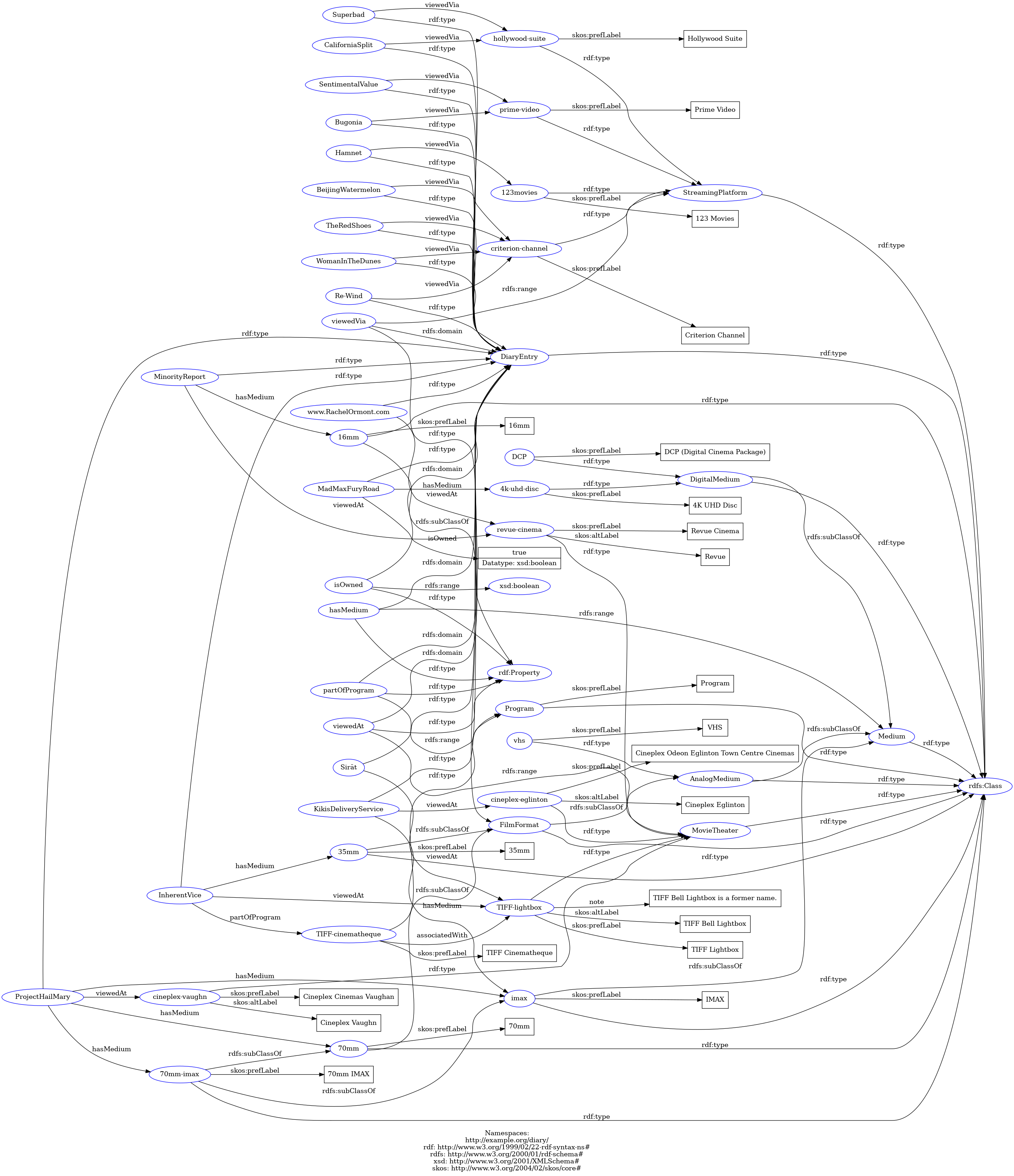
If you’d like to try interacting with the graph yourself, go to the RDF Playground, copy and paste my RDF document into the “Text” region on the left side of the page, and then click the “Graph” icon.
We’re Not Done Yet
I actually had a lot of fun making this! And I can already envision where to take this project next. The real value of building a knowledge graph using RDF standards is the ability to take advantage of “linked data,” so in a follow-up post, I’d like to connect my knowledge graph to Wikidata and ask more questions using information that I never encoded myself (e.g., “Which movies scored above 90% on Rotten Tomatoes?” or “What percentage of movies passed the Bechdel test?”)
Beyond that, I will need to come up with a scalable way to ingest new Letterboxd data into my graph so that I don’t need to handcode everything. Then, of course, I want to incorporate an LLM and create a proper GraphRAG system.
I hope you found this walkthrough useful. More than that, I hope it inspired you to start making your own small knowledge graph. This was a long post, and yet we’re just getting started!


